Most website redesigns go fine right up until launch day. Then traffic falls off a cliff, and nobody can tell you why for three weeks.
Here is the short version of why. A redesign changes your URLs. Google has spent years learning the old ones. If nobody maps the old addresses to the new ones before you go live, every ranking you built points at a page that no longer exists, and you start over.
That is the step this checklist is built around, because it is the one that costs real money and it is the one most redesign quotes do not mention.
What should be on a website redesign checklist?
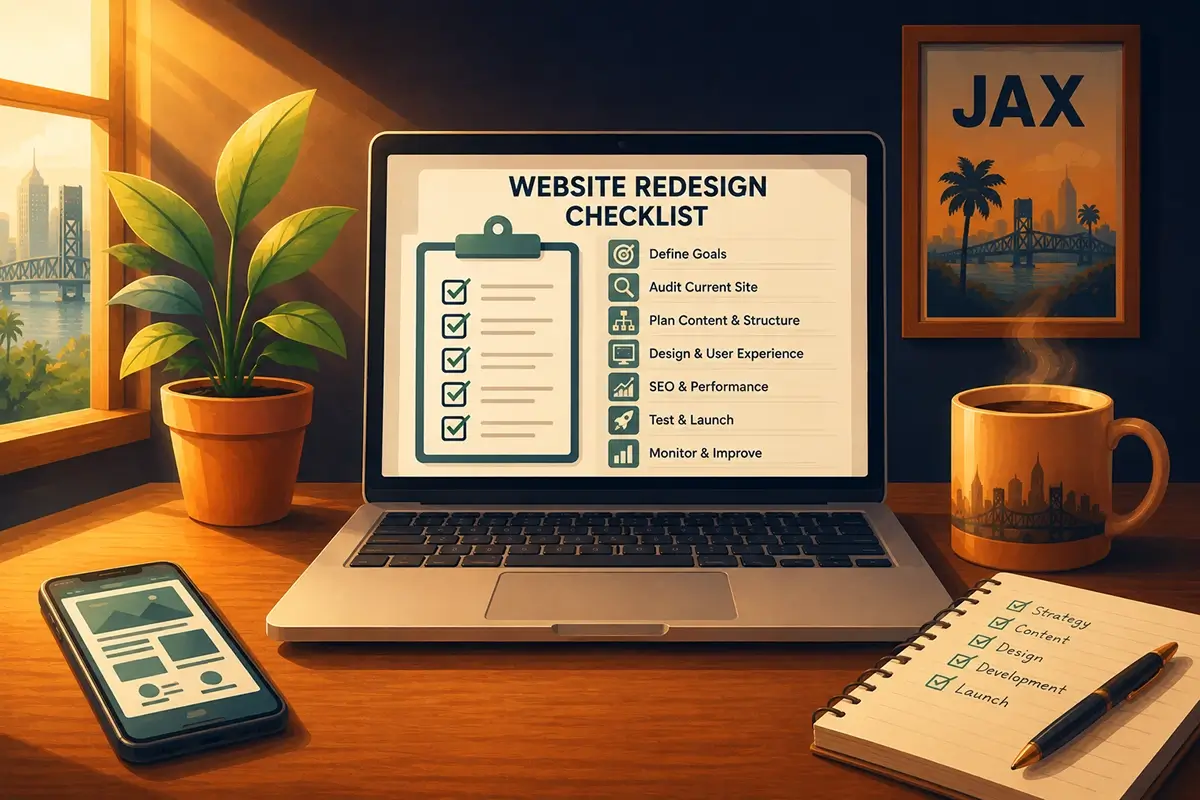
A complete website redesign checklist has eight steps: set a measurable goal, benchmark your current traffic and rankings, audit what is already working, map your audience and content, design mobile-first, map every old URL to a new one, test on staging, then launch and monitor for 30 days.
The order matters more than the list. Benchmarking before you touch anything is what makes it possible to prove the redesign worked, or to catch it fast when something breaks.
Do you actually need a redesign?
Before the checklist, the honest question. A redesign is expensive and disruptive, and plenty of sites that feel tired just need a content refresh and a faster host.
You probably do need one if the site was built before 2018 on a page builder nobody supports anymore, if it fails on a phone, if you can't update your own hours without calling someone, or if your business has changed enough that the site describes a company you no longer run.
You probably don't need one if the design is dated but the structure is sound and your traffic is healthy. That is a facelift and a maintenance plan. Be suspicious of anyone who tells you otherwise before they have looked at your analytics. If what you are really asking is a timing question, we covered that one separately in how often you should redesign your website.
The eight-step checklist
1. Set one measurable goal
Not "modernize the site." Pick a number: more form submissions, more calls from the Jacksonville search results, a lower bounce rate on the services pages. A redesign with no number attached becomes a debate about colors, and the person with the strongest opinion wins instead of the customer.
2. Benchmark before you touch anything
This is the step that makes step 6 survivable. Before any work begins, export your current organic traffic, your top 20 landing pages, your top 20 ranking keywords, and your conversion rate from Google Analytics and Search Console. Save it somewhere that is not the website.
If you skip this, you'll have no way to answer the only question that matters 60 days after launch: is this better or worse than what we had?
The redesign that turned out not to be a redesign. An author came to us wanting his whole site rebuilt. Standard request, and we could have taken it. But when we went looking for his baseline numbers, there were none. The previous designer had never installed Google Analytics and had never submitted the sitemap to Search Console. Not a line of data in two years. Nobody could say what was working, because nobody had ever been able to see it.
So we did not redesign anything. We installed analytics, submitted the sitemap, and waited two months to find out which pages people were actually visiting. With real numbers in hand, the problem turned out to be structural. People were landing on the site and couldn't find their way to the thing he wanted them to do. We checked his page speed, then built a restructure plan around the pages the data said mattered.
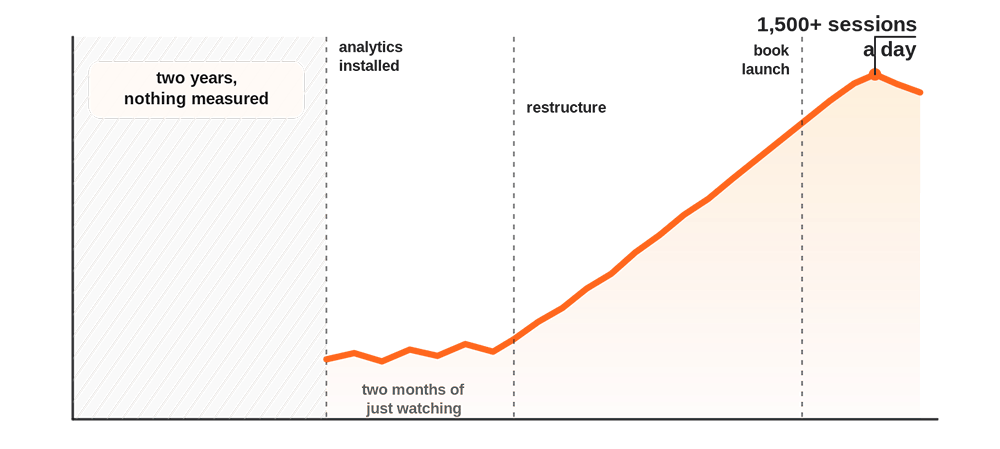
He went from zero measurable traffic to over 1,500 sessions a day as his book launch approached. To be straight about it, the launch itself drove a lot of that demand. The point is that without analytics he would have spent redesign money in the dark and never known whether any of it worked. The rebuild he came in for turned out to be the least urgent thing on the list.
If you have no baseline at all, that is your first project, and the redesign waits.
3. Audit what is already working
Your worst-looking page might be your best-performing one. Sort your landing pages by organic traffic and read the top ten before you decide what to cut. Every redesign has a moment where somebody wants to delete a page that quietly brings in a third of the leads because it does not match the new look.
Note which pages have backlinks pointing at them from other sites. Those are the ones where a broken redirect hurts most.
4. Map your audience and your content
Write down what a visitor is actually trying to do when they land on your site. In Jacksonville that is usually one of three things: figure out whether you serve their part of town, figure out what you charge, or get a human on the phone.
That first one carries more weight here than it would in most cities. After the 1968 county consolidation, Jacksonville became one of the largest cities in the country by area, 841 square miles of it. A customer in Mandarin and a customer on the Northside are both local to you and nowhere near each other, so "do you actually come out here" is a real question rather than a throwaway. If you only cover part of Duval, say so on the page people land on, somewhere they will actually see it. Build the navigation around those three jobs and most structural arguments resolve themselves.
Think about the job your customer is trying to get done rather than the service category you file it under.
5. Design mobile-first, but check your own numbers first
Mobile passed desktop worldwide a while ago. As of July 2026, StatCounter puts mobile at 52.57% of global web traffic against 45.93% for desktop.
Now ignore that number and go look at your own. A Jacksonville B2B service business often runs closer to even, or even desktop-heavy, because people research vendors from a work computer. The global stat is a reason to take mobile seriously. Your own Analytics is what tells you which layout to build first.
6. Map every old URL to a new one
Here is the actual work. Crawl your existing site and export every URL. For each one, decide: does this page survive with the same address, survive at a new address, or go away? Every URL in the second and third groups needs a 301 redirect to its closest equivalent on the new site.
Rules that save projects:
- Never redirect everything to the homepage. Google's own site move guidance warns that pointing many old URLs at one irrelevant destination, the new homepage being the classic example, may be treated as a soft 404. The rankings go anyway.
- Match each old URL to whichever new page covers the same content, even if it now lives somewhere else in the menu.
- If a page is genuinely gone with no equivalent, let it 404 on purpose. Dropping someone on an unrelated page is worse than a dead end.
The 35 pages nobody mapped. A client came to us after his redesign was already finished, looking for help with maintenance. Somewhere in that first conversation he mentioned, almost in passing, that his traffic used to be much higher and had fallen off badly since the new site went live. He was not asking us to fix it. He had more or less accepted it.
We went into his Analytics and Search Console and found 35 indexed pages that had been driving his conversions. Every one of them had a new address on the new site, and not one had a 301 redirect pointing at it. Thirty-five money pages, live in Google's index, all leading to nothing. Anyone who clicked a search result for those pages hit a dead end, and Google had started dropping them accordingly.
We found them, mapped each one to its new address, and put the redirects in place. His traffic started coming back.
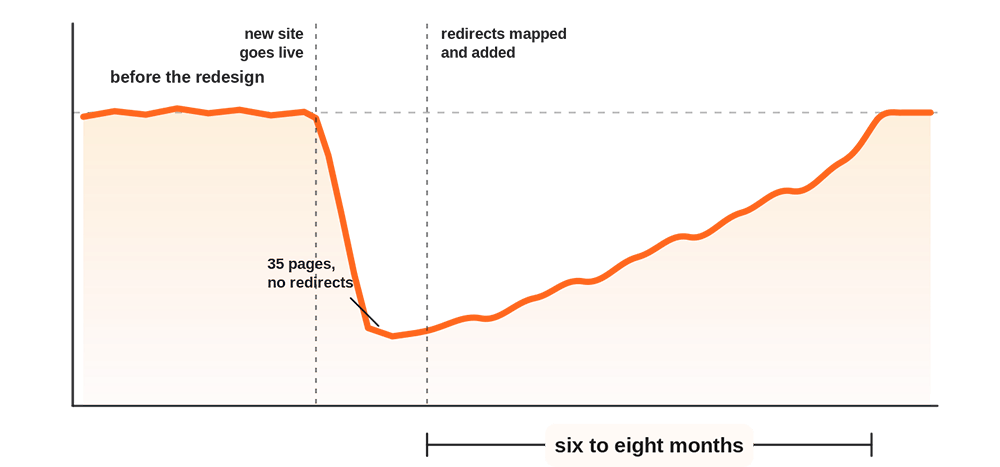
Here is the part worth sitting with, though. It took six to eight months to get back to where it had been before the redesign. Finding the problem is the fast part. Google has to recrawl, reassess, and rebuild its confidence in pages it had already started writing off, and none of that happens on your schedule.
That gap between the fix and the recovery is the whole argument for doing this before launch instead of after. An afternoon of redirect mapping in week one costs a great deal less than two quarters of waiting.
Nobody did anything malicious here. The redirect map is just the least visible part of a redesign, which is exactly why it is the part that gets skipped. It does not show up in a mockup.
7. Test on staging, not in public
Build on a staging site that search engines cannot index. Before launch, check the redirect map against your benchmark list from step 2, submit test forms and confirm the emails actually arrive, load the site on a real phone rather than a browser window resized to look like one, and run the pages through Google's PageSpeed Insights so you know your Core Web Vitals before you go live instead of after.
Accessibility belongs here too. Check that every image has alt text, that the contrast is readable, and that the site can be operated with a keyboard alone. It is easier to build in than to retrofit, and it is the difference between a site that turns customers away and one that does not.
8. Launch, then watch for 30 days
Launch day is the middle of the project, not the end. In the first 30 days: resubmit your sitemap in Search Console, watch the coverage report for a spike in 404s, compare organic traffic against your benchmark weekly, and fix broken redirects as they surface rather than in a batch at the end of the month.
A small dip in the first two weeks is normal while Google recrawls. A steady decline into week four is a redirect problem, and it is fixable if you catch it there.
What a redesign costs when it goes wrong
The rebuild quote is the small number. The big one is the months of lost search traffic while you figure out that the redirect map was never built, and then the further months of waiting for Google to give back what you already owned.
That is also why the maintenance plan matters more after launch than before it. A new site with no one watching it collects outdated plugins, slow pages, and security gaps within months, and then you're back where you started, looking at a site that feels tired for reasons nobody can name. WordPress maintenance is the part most redesign projects forget to budget for.
Why Website HQ
We build custom WordPress sites and we keep them running afterward, which means we are the ones who find out whether the redirect map was done right. Design, hosting, security, maintenance, and SEO sit under one relationship, so there is no gap between the people who launched the site and the people responsible for it on a Saturday.
Every Website HQ WordPress maintenance plan includes daily backups, daily security scans, hack recovery and malware cleanup, a Cloudflare firewall and CDN, and ongoing WordPress updates. Plans start at $125 per month.
Ruben O., a global marketing director we work with, put the SEO side of it plainly: "Within 4 months of Website HQ taking over our SEO we generated more sales than we did in 5 years with our previous SEO company."
If you're earlier in the process and still working out budget and who to hire, read our Jacksonville WordPress web design guide first. It covers the numbers this post assumes you already have. And if the site is staying put and you just want to know what a good one includes, we keep a general website checklist for Jacksonville businesses as well.
The takeaway
A redesign is a migration with a new coat of paint on top. The migration is the part that decides whether the new site earns more than the old one did.
If you're planning a redesign and nobody has said the words "redirect map" to you yet, that's worth a conversation before anyone starts designing. Book a discovery call and we will look at your current site, tell you which pages you cannot afford to lose, and give you the list of what to keep, what to fix, and what to retire. Then you can go run your business, not your website.

You didn't start your business to become a WordPress technician, yet here you are treating your most critical business asset like a hobby project. While you're spending hours on updates and crossing your fingers that nothing breaks, your competitors are focused on what actually makes money.
👋 I'm Jeane Sumner, and Website HQ doesn't just host your site – we armor it, optimize it, and monitor it so you can get back to running your business instead of fixing it. Book your Site Care strategy call and never worry about your website again.