

Google Search Console finally tells you when AI is citing your site
For most of the last two years, business owners watching their organic traffic dip had no real way to answer the obvious question: is Google’s AI taking my clicks, or is something else going on? AI Overviews and AI Mode answered questions on the results page, your click-through rate fell, and Search Console reported the whole thing as one undifferentiated “organic search” lump.
That changed today. On June 3, Google rolled out dedicated Search Generative AI performance reports in Search Console. You can now see how often your site shows up inside AI Overviews, AI Mode, and the AI-powered parts of Discover, separated from your regular blue-link results. The blind spot has a flashlight pointed at it.
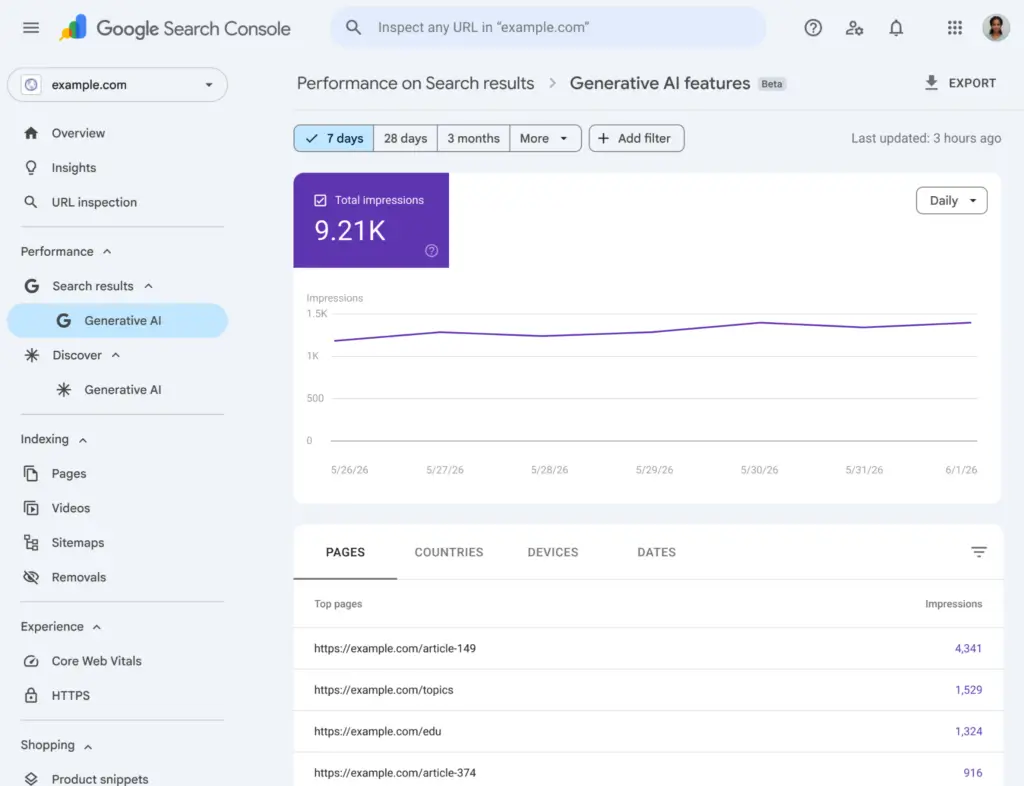
Here’s what the update actually does, what it does not do, and why this is the moment to make sure your site is properly wired up to report on any of it.
What is new in Search Console
Three things landed at once.
Dedicated AI performance views. Search Console now has separate reporting sections for AI Overviews (the summary answers at the top of regular search), AI Mode (Google’s conversational deep-dive experience), and generative AI elements inside Discover. Your historical aggregate performance report still includes this data so your year-over-year comparisons remain intact. The new views just let you isolate the AI portion.
Granular metrics that were not there before. You can pull impressions (how many times a URL from your site appeared as a cited source in an AI feature), pages (which exact URLs Google is grounding its AI answers on), countries, devices, and a date timeline with hourly, daily, weekly, and monthly granularity.
An opt-out toggle. Site owners can now explicitly choose whether their content can be used to ground AI Overviews and AI Mode responses. Opting out is permanent for as long as the toggle is flipped: your site will stop receiving traffic or impressions from those AI features entirely. Google says the toggle is not a ranking signal in regular search results, but the trade-off is real and the opt-out is the kind of decision a business owner should make with their eyes open, not by accident.
A few things to know before you go looking for the new reports in your account. The rollout is limited and starts with a subset of site owners (UK first, per Google), so if you do not see the new sections yet, that is expected. Search Labs experimental data is excluded. And the report shows impressions only. No clicks, no click-through rate, no average position, no query-level data on the AI side. That detail matters for what comes next.
Why this matters for your business
The most useful sentence in any SEO conversation for the next twelve months is going to be some version of: “AI is showing your content to people who never click through, and that has a value you can finally measure.”
Before today, if your traditional click-through rate dropped on a page that used to rank in position one, you were left guessing whether AI Overviews ate the click or whether something else moved. With the new reports you can finally see the other half of the story: a high-value impression inside an AI answer where your brand is cited, your URL is named, and a smaller but more qualified slice of users clicks through afterward. That is not a CTR problem. That is brand-level visibility on a surface that did not exist three years ago, and you can now report on it as such.
For service businesses and local businesses especially, the country and device breakdowns are going to be quietly powerful. If you run a Jacksonville-based law firm and your content is being grounded into AI Overviews for “estate planning attorney” queries on mobile in Florida, that is a specific, defensible result you can put in front of a partner who has been asking what SEO is actually doing for them.
The Search Console data is only half useful without Google Analytics
Here is the part of this story most articles will skip. Search Console reports on what happened on Google’s side of the search result. Google Analytics 4 reports on what happens after someone clicks through to your site. If you only have Search Console, you can see that AI cited you 4,200 times last month. You cannot see whether the people who did click then signed up, called, or bought anything.
Connecting Google Search Console to Google Analytics 4 closes that loop. Once the two are linked, GA4 gives you two extra reports: Google Organic Search Queries (the search terms that drove visits, with their Search Console metrics) and Google Organic Search Traffic (the landing pages those visits hit, with the on-site behavior layered on). You can finally answer the question that actually matters: “Of the people who found us through Google, which queries and pages produced revenue?”
Most of the WordPress sites we take over at [[Website HQ]] are missing this connection. Sometimes Search Console is verified but never linked. Sometimes GA4 was set up by someone who left two years ago and nobody touched the property settings after that. Sometimes the previous agency ran their own account and the owner never got admin access. Whatever the cause, the result is the same: the data exists and is free, and nobody on the team can actually see it.
If you are reading this and you are not sure whether your accounts are connected, that is the maintenance conversation. The new AI reports just made the cost of not knowing higher.
How to actually get this set up
Four steps, in order. None of them cost anything except attention.
- Verify Google Search Console for your domain. Use the Domain property option (not the URL prefix option) so subdomains and protocols are covered in one place. Confirm verification through your DNS provider. If your previous agency owns the property, get yourself added as Owner so you do not lose access when the relationship ends.
- Confirm you are on Google Analytics 4. Universal Analytics has been fully off since July 2024. If your reporting still references “UA-” tracking IDs, your analytics has been broken for two years and nobody noticed. Stand up a fresh GA4 property, install the measurement tag, and validate it with Tag Assistant before you trust the data.
- Link the two accounts. In GA4, go to Admin, then Product links, then Search Console links. Pick the verified Search Console property that matches the GA4 data stream’s URL. Save. Then publish the Search Console section in the Reports library so the new reports actually show up in your sidebar. This is the step everyone skips and then complains they cannot find the data.
- Check back in two weeks for the new AI sections. If your site is in the rollout, the AI Overviews, AI Mode, and Discover views will appear in Search Console under Performance. If they are not there yet, they are coming. In the meantime, the GSC-to-GA4 link makes everything else more useful.
What we would do with the new reports in the first month
Three things, and they are all conversations more than they are tasks.
Look at which of your URLs are being grounded into AI Overviews. Those are the pages that already earned their authority on a topic. They are the ones to update, expand, and add schema to first, because the AI is telling you they work. (If you have not added schema markup yet, our Schema Markup Generator is the fastest way to get started. See also our Schema markup guide.)
Compare the impression curves on AI Overviews against the click curves in the standard performance report for the same URLs. Look for the diverging pattern: impressions in AI staying flat or rising while clicks fall. That is the pattern that tells you AI is doing brand-awareness work for you. The strategic answer is not to panic about clicks. It is to make sure the people who do click through land on a page that converts.
Decide what you want to do about the opt-out toggle, on purpose. For most businesses the answer is to stay opted in, because a cited impression inside an AI answer is still a brand impression you would otherwise be paying for. But the decision should be deliberate. Do not let a setting that material be the default.
Frequently asked questions
Do I have to do anything to get the new AI reports?
No setup is required. If your site is in the rollout, the new sections appear in your existing Search Console property under Performance. Google is rolling this out in waves, so it may take a few weeks to show up.
Does opting out of AI features hurt my regular search rankings?
Google says the opt-out toggle is not used as a ranking signal for traditional search results. Opting out only removes you from AI Overviews, AI Mode, and AI features inside Discover. Your traffic from those features will go to zero. Your traditional blue-link traffic should not be affected.
Why does the new AI report only show impressions and not clicks?
For now, Google is only reporting impression-level data inside AI features. There is no click data, click-through rate, average position, or query-level breakdown on the AI side. Google has said it will continue adding metrics over time based on feedback. Treat impressions as a brand visibility metric, not a traffic metric.
Do I need a separate tool to track AI search visibility?
For most small businesses, no. The new Search Console reports cover Google’s AI surfaces, which is where most AI search activity in the US still happens. Specialty tools that track citations across ChatGPT, Perplexity, and other engines are useful at higher spend levels but are not where most owners should start. Start with the Search Console data and Google Analytics, get a baseline, then layer on more tools when there is something to measure.
How is this different from the existing Search Console performance report?
The standard performance report already included AI Overview and AI Mode impressions, but they were bundled in with regular blue-link results. You could not tell what was AI and what was not. The new reports break that data out into its own view so you can analyze AI visibility separately, while still keeping your aggregate historical totals intact.
What does this mean for sites that already opted out of AI training?
Opting out of having your content used to train Google’s AI models (the Google-Extended user agent control) is a different setting from opting out of being cited inside AI Overviews and AI Mode. The new toggle controls citation and grounding inside live AI search features. The two settings can be used together or independently.
How do I connect Google Search Console to Google Analytics 4?
In GA4, go to Admin, then Product links, then Search Console links. Select the verified Search Console property that matches your GA4 data stream’s domain, then publish the Search Console section to your Reports library. The two reports that appear are Google Organic Search Queries and Google Organic Search Traffic. We can do this for you on any Site Care Plan.
For more on getting your site ready for AI search, see our previous posts:
- Understanding schema markup: a guide to better SEO visibility
- What 10 questions you should ask a website maintenance company
- How to choose the right WordPress themes and plugins for your business site
The new AI reports are a quiet but real win for business owners who want to know what is actually happening with their website. The owners who get the most out of them will be the ones whose Search Console and Google Analytics are already connected, properly verified, and being looked at. If yours are not, that is the first conversation to have. Contact Website HQ and we will audit your setup, link your accounts, and start watching the new reports with you.