Google quietly gave your readers a way to put your website at the front of the line. It's called preferred sources, and hardly anyone has set it up, because everyone who's heard of it assumes it's a news-publisher thing.
We thought so too. Then we spent 30 seconds checking, and it turns out Website HQ was already in Google's system, sitting there eligible, waiting for us to do something about it.
Your site might be sitting there too. Here's how to find out.
What preferred sources actually does
Google now lets people pick specific websites they want to see more of. The setting lives in a page most people will never visit on their own.
When a reader adds your site as a preferred source, two things change for that reader. Your articles show up more often in the Top Stories area of their search results, marked with a "preferred" label. And in AI Overviews and AI Mode, your content gets a "preferred" badge when it appears in their answers.
That second part is the one we care about. AI Overviews are eating clicks across every industry, and most of the advice about surviving them boils down to "publish good content and hope." This is one of the few levers where your reader gets a direct say in whose content the AI shows them.
Why this matters for a small site
Think of preferred sources like your email list. A subscriber gave you permission to show up in their inbox. A reader who marks you preferred gives you permission to show up bigger in their Google results, including the AI-generated ones.
That comparison also tells you what it's worth. Loyalty tools compound: the reader who marked you preferred sees you more, trusts you more, and buys from you when they're ready.
Two limits before you get excited. A preferred sources button won't change your rankings, and it has zero effect on how strangers find you. Google is clear that each reader's choice only affects that reader's results.
It costs nothing, and the setup on your end is one link. For that price, "modest but real" is a great deal.
The 30-second eligibility check
Google only includes some sites in the preferred sources picker, and they don't publish the criteria. But checking your own site takes half a minute:
- Go to google.com/preferences/source.
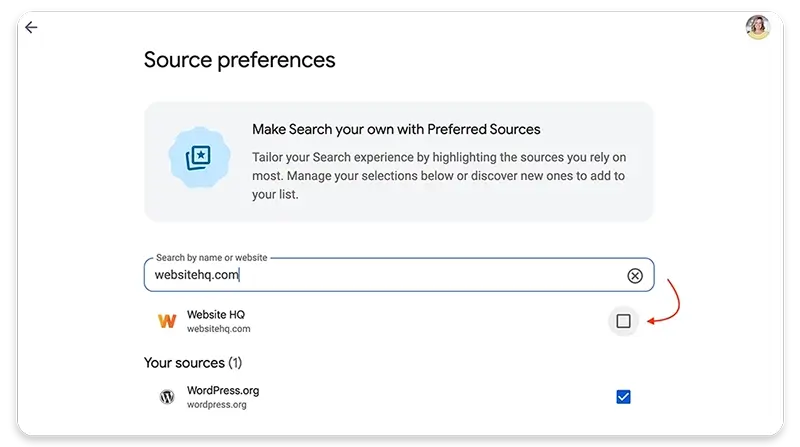
- Type your domain into the search box.
- See if your site comes up.
If your site appears, you're eligible, and everything below applies to you.
A couple of rules from Google's documentation worth knowing. Only domains and subdomains qualify: yoursite.com works, blog.yoursite.com works, but somewebsite.com/yourblog doesn't. So if your content lives in a subdirectory of a bigger platform, it can't be selected on its own.
And if your site doesn't show up at all? There's no application form, and Google hasn't said how sites get added. Our honest advice is to keep publishing under your own domain and check back quarterly. The fix for "Google doesn't consider my site a source yet" is the same boring, effective work as every other visibility problem.
How to set it up (the simple way)
Google offers two implementations: a JavaScript button and a plain link.
The JavaScript version renders a nice Google-styled button, but it loads a script from Google's servers on every page where it appears. We skipped it. We spend a lot of time on this blog telling you to stop bolting third-party scripts onto your WordPress site, and we're keeping our own advice.
The plain link does the same job with zero scripts. This is called the deeplink, and it's one line:
https://www.google.com/preferences/source?q=yoursite.comSwap in your own domain. When a reader clicks it, they land on Google's preferences page with your site already filled in, one checkbox away from adding you. Two clicks total.
You can dress the link up however you like. Google provides official badge images in 17 languages, free to download, in light and dark versions. Upload the badge to your media library, link it to your deeplink, and you're done.
The plain link has a bonus the JavaScript button can't touch: it works everywhere. Drop it in your email newsletter, your social posts, your Google Business Profile updates. A script only works on your own pages.
Where to put it
Placement matters more than the badge itself. This is an ask you make of people who already like you, so put it where warm readers finish consuming your content:
- The end of blog posts, after the article delivers its value
- Your email newsletter footer
- A thank-you page after someone subscribes or buys
Skip the homepage hero and the popup. A first-time visitor has no reason to prefer you yet, and asking too early reads as needy.
You'll find ours at the bottom of this post. That's the whole implementation: one image, one link.
One gotcha before you go check your rankings
After you add your own site as a preferred source (and you should, it's your site), remember that your Google results are now personalized in your own favor.
If you search for your target keywords while logged in, you'll see your site doing suspiciously well. That's your preference talking. Check your real rankings in an incognito window, or you'll be celebrating a boost your customers can't see.
The bigger picture
Preferred sources is part of a pattern we've been tracking all year: the machines answering people's questions are getting more configurable, and the sites that show up are the ones that raised their hands.
We wrote a whole series on making your site legible to AI systems with an llms.txt file, and on measuring whether any of it works. Preferred sources belongs in the same toolbox, with one difference: this lever belongs to your readers.
Give them the button. The ones who love your work will press it.

You didn't start your business to become a WordPress technician, yet here you are treating your most critical business asset like a hobby project. While you're spending hours on updates and crossing your fingers that nothing breaks, your competitors are focused on what actually makes money.
👋 I'm Jeane Sumner, and Website HQ doesn't just host your site – we armor it, optimize it, and monitor it so you can get back to running your business instead of fixing it. Book your Site Care strategy call and never worry about your website again.